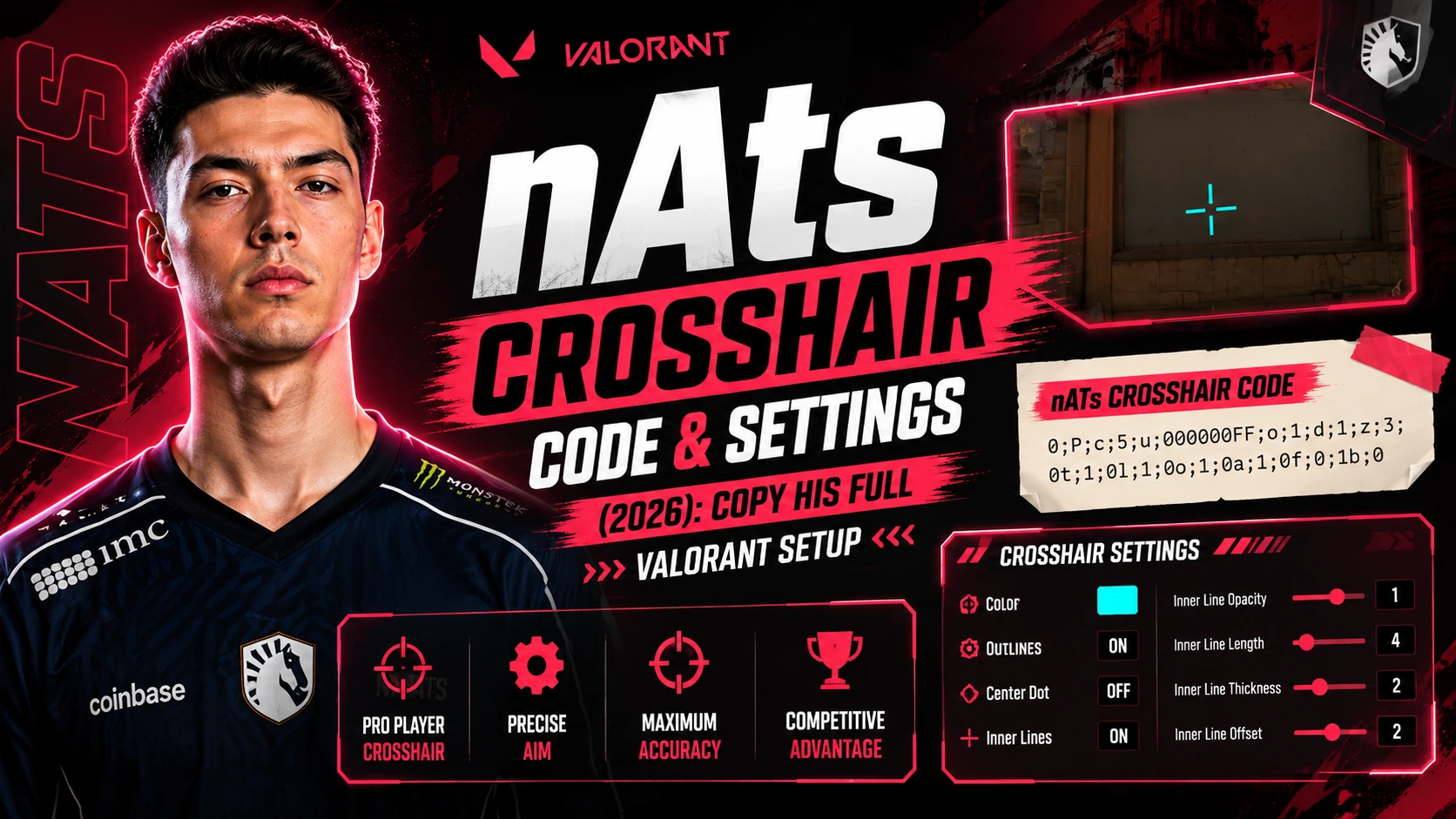
Want to aim like a pro? nAts is one of the best Sentinel players in Valorant. His crosshair is small, clean, and easy to see. This guide gives you his exact nAts crosshair code. You also get his mouse settings, DPI, and sensitivity. Copy his setup in under two minutes.
Who is nAts?
Ayaz “nAts” Akhmetshin is a professional Valorant player from Russia. He plays for Team Liquid. He first became famous with Gambit Esports. His team won VCT Masters Berlin in 2021. He also helped Team Liquid win the VCT EMEA League in 2023.
nAts is known for smart lurking and calm clutch plays. He mostly plays Sentinel agents like Cypher and Killjoy. His clean crosshair and steady aim make him a great player to copy.
nAts Crosshair Code (Latest)
Here is the current nAts crosshair code. Copy it and paste it into your own Valorant settings.
|
0;P;c;1;o;1.000;0a;1.000;0l;2;0t;1;0o;2;0f;0;1b;0 |
Pro settings change often. Some older lists still show a past version of his code. Always check for the newest update before you copy it into your game.
How to Import the nAts Crosshair Code
Adding this crosshair code to Valorant is quick. Follow these steps:
-
Open Valorant and go to Settings.
-
Click on the Crosshair tab.
-
Scroll down to find “Import Profile Code.”
-
Paste the nAts crosshair code into the box.
-
Click Confirm. Your new crosshair is ready to use.
nAts Crosshair Settings Explained
This table breaks down each part of his crosshair. It helps you understand why it looks so clean.
|
Setting |
Value |
|
Color |
Green |
|
Custom Color Code |
#00FF00 |
|
Outlines |
On |
|
Outline Thickness |
1 |
|
Center Dot |
Off |
|
Inner Lines |
On |
|
Inner Line Length |
2 |
|
Inner Line Thickness |
1 |
|
Inner Line Offset |
2 |
|
Outer Lines |
Off |
|
Firing Error |
Off |
|
Movement Error |
Off |
Green stands out on most Valorant maps. A small crosshair with no outer lines keeps the screen clean. This helps nAts see enemies fast and aim with more control.
nAts Valorant Settings: Mouse, DPI & Sensitivity
Your crosshair works best with the right mouse settings. Here is what nAts uses in his games.
|
Setting |
Value |
|
Mouse |
ZOWIE U2-DW |
|
DPI |
800 |
|
In-Game Sensitivity |
0.49 |
|
eDPI |
392 |
|
Scope Sensitivity |
1.0 |
|
Polling Rate |
1000 Hz |
|
Windows Sensitivity |
6 |
A low eDPI gives smooth and steady aim. Many top pros use a similar range. You do not need his exact numbers. Try settings close to his, then pick what feels natural to your hand.
nAts' Full Gear Setup
Your mouse and monitor matter as much as your crosshair. A good setup helps every click feel sharp, and every flick feel smooth.
-
Mouse: ZOWIE U2-DW, a light wireless mouse built for fast flicks.
-
Polling Rate: 1000 Hz, so the mouse sends signals to the PC very fast.
-
Grip Style: Most pros with this mouse shape use a palm or claw grip.
-
Mouse Pad: A large cloth pad gives more room for low-sensitivity swipes.
You do not need the exact same brand of gear. What matters more is comfort. A mouse that feels heavy or too small in your hand will slow down your aim, even with the right crosshair code.
nAts' Playstyle and Agent Pool
-
nAts is famous for his patience. He does not rush fights. He waits, watches, and picks the right moment to strike. This style is called lurking. It confuses enemies and wins rounds late.
-
He mainly plays Sentinel agents. These include Cypher, Killjoy, and Chamber. Sentinel agents use traps and gadgets to guard sites. A clean crosshair helps nAts land quick shots the moment an enemy walks into his trap.
-
His calm mindset also helps in clutch moments. A clutch is a 1-vs-many fight at the end of a round. nAts stays calm and picks his shots one at a time instead of panicking.
Tips to Improve Your Aim Like nAts
Copying a pro setup is a great first step. But your aim still needs daily practice. Try these simple tips:
-
Warm up for 10 minutes before ranked games.
-
Practice crosshair placement at head level.
-
Use the shooting range to test the new crosshair code.
-
Keep your sensitivity steady for at least two weeks before you change it again.
-
Watch pro matches to learn when to peek and when to hold.
Small, steady changes work better than big changes every day. Give each setting time before you judge it.
Why Copy a Pro Crosshair Code?
Pro crosshair codes save you time and effort. Here is why players copy them:
-
They are tested in real, high-pressure matches.
-
They are simple and do not block your view.
-
You skip hours of trial and error.
-
You get a strong starting point for your own setup.
Your best crosshair still depends on your monitor and your eyes. Start with the nAts crosshair code. Then adjust the size or color until it feels right for you.
FAQs About nAts Crosshair and Settings
What is nAts' crosshair code?
His current code is 0;P;c;1;o;1.000;0a;1.000;0l;2;0t;1;0o;2;0f;0;1b;0. Paste it into the crosshair import box inside Valorant settings.
What color is nAts' crosshair?
Green. Many pro players pick green because it stands out clearly against most Valorant maps.
What DPI and sensitivity does nAts use?
nAts plays at 800 DPI with 0.49 in-game sensitivity. This gives him an eDPI of 392.
What mouse does nAts use?
nAts uses a ZOWIE U2-DW wireless mouse.
Can I use the nAts crosshair code on console?
Yes. The code works on any Valorant version that supports crosshair profile import, including PC and console.
What team does nAts play for?
As of 2026, nAts plays for Team Liquid in the VCT EMEA region.
Why do pro players use a low eDPI?
A low eDPI makes small mouse moves turn into small aim moves. This gives more control during close, fast fights.
Common Mistakes When Copying Pro Crosshairs
Many players copy a code and expect instant results. This is not how it works. Avoid these common mistakes:
-
Changing your sensitivity and crosshair on the same day. Change one thing at a time.
-
Picking a crosshair color that blends into your favorite maps.
-
Copying eDPI without testing it in the shooting range first.
-
Switching settings again after one bad match. Give a setup at least a few days.
A pro setup is only a starting point. Your hand, your monitor, and your habits are different from nAts'. Small changes, tested one at a time, will help you find what truly works for you.
Final Thoughts
nAts built his setup through years of practice. Copying his crosshair code is a quick and easy start. But real improvement comes from practice, not settings alone.
Use the nAts crosshair code as your base. Copy his DPI and sensitivity as a starting range, not a fixed rule. Then adjust it slowly, one step at a time, until it feels perfect for your own aim. Over time, your muscle memory will build, and your crosshair placement will feel natural in every match.