Want to aim like a pro? The Sinatraa crosshair code is one of the most searched crosshairs in Valorant. Players copy it because it is clean, sharp, and easy to see on every map. In this guide, you get the exact Sinatraa crosshair Valorant code, the full settings breakdown, and simple steps to import it in seconds.
Who Is Sinatraa?
Jay "Sinatraa" Won is a former professional esports player. He first became famous in Overwatch. In 2019, he won the Overwatch League title with San Francisco Shock. He was also named the league's Most Valuable Player that same year. That MVP award made him one of the most recognized names in competitive shooter esports.
In 2020, Sinatraa made a big move. He switched from Overwatch to Valorant and joined Sentinels. This surprised a lot of fans, since he was at the peak of his Overwatch career. He played in VCT Stage 1 and Stage 2 in 2021, competing against some of the best Valorant teams in North America.
Today, he is known as a streamer and content creator. Many fans still watch his streams and use his crosshair settings to try to improve their own aim. His background as an MVP-level shooter is exactly why his crosshair code gets searched so often.
Sinatraa's Career Highlights
-
2019: Won the Overwatch League championship with San Francisco Shock.
-
2019: Named Overwatch League Most Valuable Player.
-
2020: Switched from Overwatch to Valorant, joining Sentinels.
-
2021: Competed in VCT Stage 1 and Stage 2 with Sentinels.
-
Present: Active streamer and content creator in the Valorant community.
Sinatraa Crosshair Code
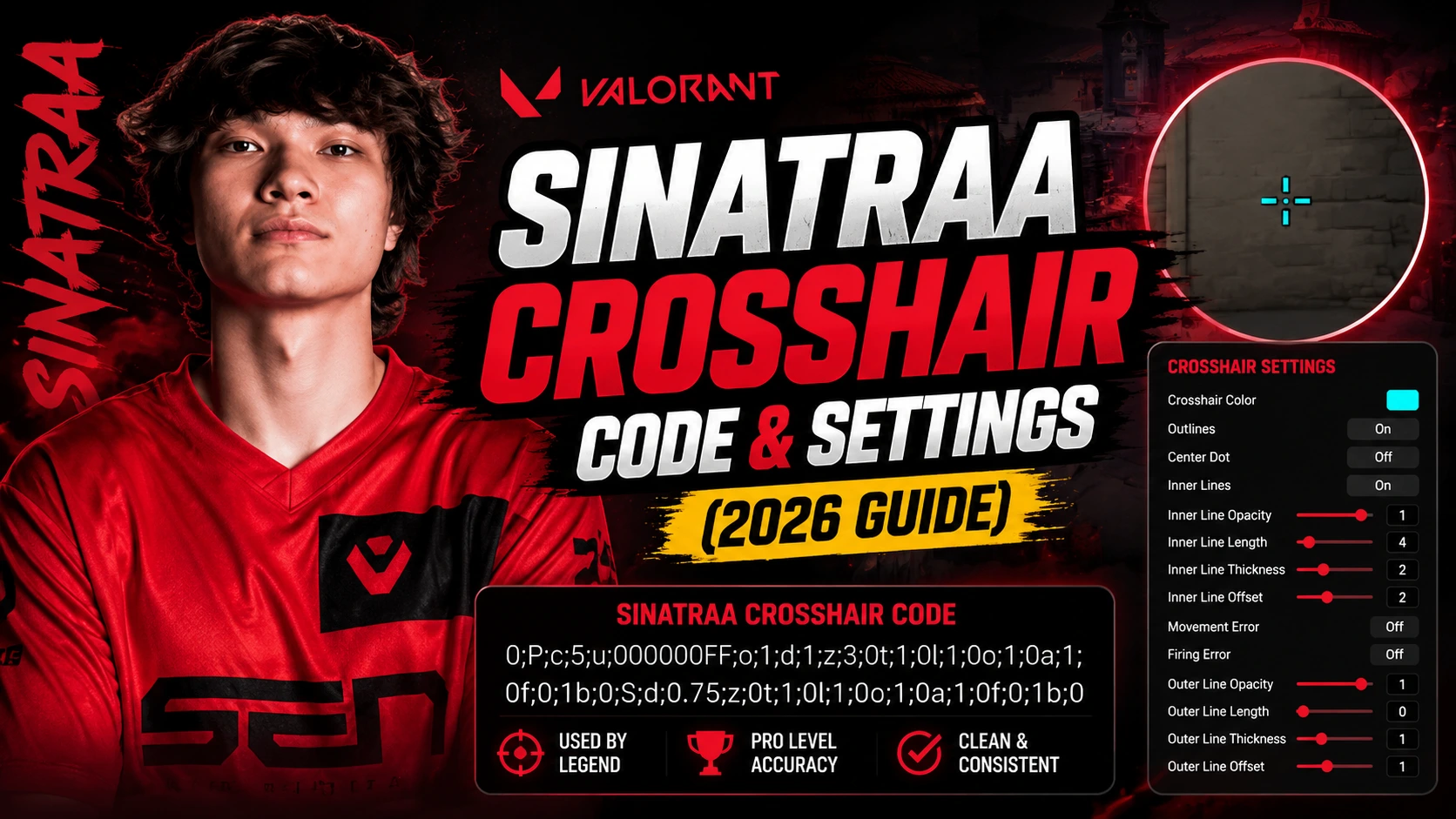
Here is the exact sinatraa crosshair code. Copy it and paste it into your Valorant settings menu.
|
Sinatraa Crosshair Code: 0;s;1;P;c;5;o;1;0t;1;0l;3;0a;1;0f;0;1t;0;1l;1;1o;1;1a;1;1m;0;1f;0 |
This code gives you a cyan crosshair with a small center gap, thin inner lines, and no center dot. It is built for players who want a clear sightline without extra clutter.
How to Import Sinatraa's Crosshair Code in Valorant
Importing a crosshair code takes less than a minute. Follow these steps:
-
Open Valorant and go to Settings.
-
Click the Crosshair tab at the top.
-
Scroll down and find the Import Profile Code box.
-
Paste the Sinatraa crosshair code into the box.
-
Click Import, then Confirm.
-
Your crosshair is now set. Head into a game and test it in the shooting range first.
Sinatraa's Full Crosshair Settings
If you want to build the crosshair by hand instead of using the code, here are all the settings:
|
Setting |
Value |
|
Crosshair Color |
Cyan (#00FFFF) |
|
Outlines |
On |
|
Outline Opacity |
1 |
|
Outline Thickness |
1 |
|
Center Dot |
Off |
|
Inner Lines |
On |
|
Inner Line Opacity |
1 |
|
Inner Line Length |
3 |
|
Inner Line Thickness |
1 |
|
Inner Line Offset |
3 |
|
Inner Line Movement Error |
Off |
|
Inner Line Firing Error |
Off |
|
Outer Lines |
On |
|
Outer Line Opacity |
1 |
|
Outer Line Length |
1 |
|
Outer Line Thickness |
0 |
|
Outer Line Offset |
1 |
|
Outer Line Movement Error |
Off |
|
Outer Line Firing Error |
Off |
Sinatraa's Mouse Settings & Sensitivity
Your crosshair works best when your sensitivity feels right too. Here is what Sinatraa uses:
|
Setting |
Value |
|
DPI |
800 |
|
In-Game Sensitivity |
0.387 |
|
eDPI |
309.6 |
|
Scoped Sensitivity |
1.0 |
|
Polling Rate |
1000 Hz |
|
Windows Sensitivity |
6 |
|
Raw Input Buffer |
On |
A low eDPI like this helps with precise, small mouse movements. It is a common choice among Valorant pros who play headshot-focused duelist and sentinel roles.
Sinatraa's Gear Setup
Gear does not make you a better player on its own, but knowing what pros use can help you pick reliable equipment:
-
Monitor: BenQ Zowie 240Hz monitor
-
Keyboard: Logitech G Pro (blue switches)
-
Resolution: 1920x1080, 16:9 aspect ratio
-
Display Mode: Fullscreen
Why This Crosshair Works for Sinatraa's Playstyle
Sinatraa's crosshair is small, tight, and free of distractions. The cyan color stands out clearly against most Valorant maps, so his eyes find it fast. There is no center dot, which keeps his view of the target clean during close-range duels.
The thin inner lines sit close to the center. This helps with quick flick shots. Since movement and firing error are turned off for both inner and outer lines, the crosshair stays steady and predictable, even while spraying or moving.
This kind of steady crosshair is common among players who came from other shooters before Valorant, since it removes surprises during a gunfight. A crosshair that jumps around while you move or shoot can throw off your aim at the exact moment you need to land a shot, so a fixed design like this one gives you one less thing to think about in a clutch round.
How to Adjust This Crosshair for Your Own Screen
Not every setup looks the same. A crosshair that looks perfect on one monitor might feel too small or too bright on another. Here is how to fine-tune Sinatraa's crosshair code for your own screen:
-
If the cyan color is hard to see on bright maps, try switching to white or green in the color menu.
-
If the lines feel too thin on a large monitor, raise the inner line thickness by 1.
-
If you play on a small resolution, reduce the inner line offset slightly so the crosshair feels tighter.
-
Always test changes in the shooting range before jumping into a ranked match.
Small tweaks like these keep the core design of Sinatraa's crosshair while making it fit your eyes and your screen.
Common Mistakes When Copying Pro Crosshair Codes
Many players copy a pro's crosshair code and expect instant results. Avoid these common mistakes:
-
Copying the code but never testing it in the shooting range first.
-
Using a pro's exact sensitivity without adjusting it for your own mouse and monitor size.
-
Ignoring your own eyesight and screen brightness, which change how visible a color like cyan will be.
-
Expecting the crosshair alone to fix aim. Practice and game sense matter more than any code.
Frequently Asked Questions
What is the Sinatraa crosshair code?
The Sinatraa crosshair code is 0;s;1;P;c;5;o;1;0t;1;0l;3;0a;1;0f;0;1t;0;1l;1;1o;1;1a;1;1m;0;1f;0. Paste it into the Crosshair Import Code box in Valorant settings.
What color is Sinatraa's crosshair?
Sinatraa uses a cyan crosshair. It is bright and easy to see on most Valorant maps.
Does Sinatraa use a center dot?
No. Sinatraa's crosshair has the center dot turned off for a cleaner view.
What sensitivity does Sinatraa play on?
Sinatraa plays at 800 DPI with 0.387 in-game sensitivity, giving an eDPI of 309.6.
Can I use Sinatraa's crosshair even as a beginner?
Yes. Any player can import this crosshair code. Just remember that sensitivity and settings should still match your own comfort level.
Does the Sinatraa crosshair code work on every map?
Yes. Crosshair codes in Valorant are not tied to a specific map. The same Sinatraa crosshair code will look and work the same way whether you play on Bind, Ascent, or any other map.
Why do so many players search for pro crosshair codes?
Pro crosshair codes save time. Instead of testing dozens of combinations, players copy a setup already proven at a high skill level, then adjust small details to match their own screen and comfort.