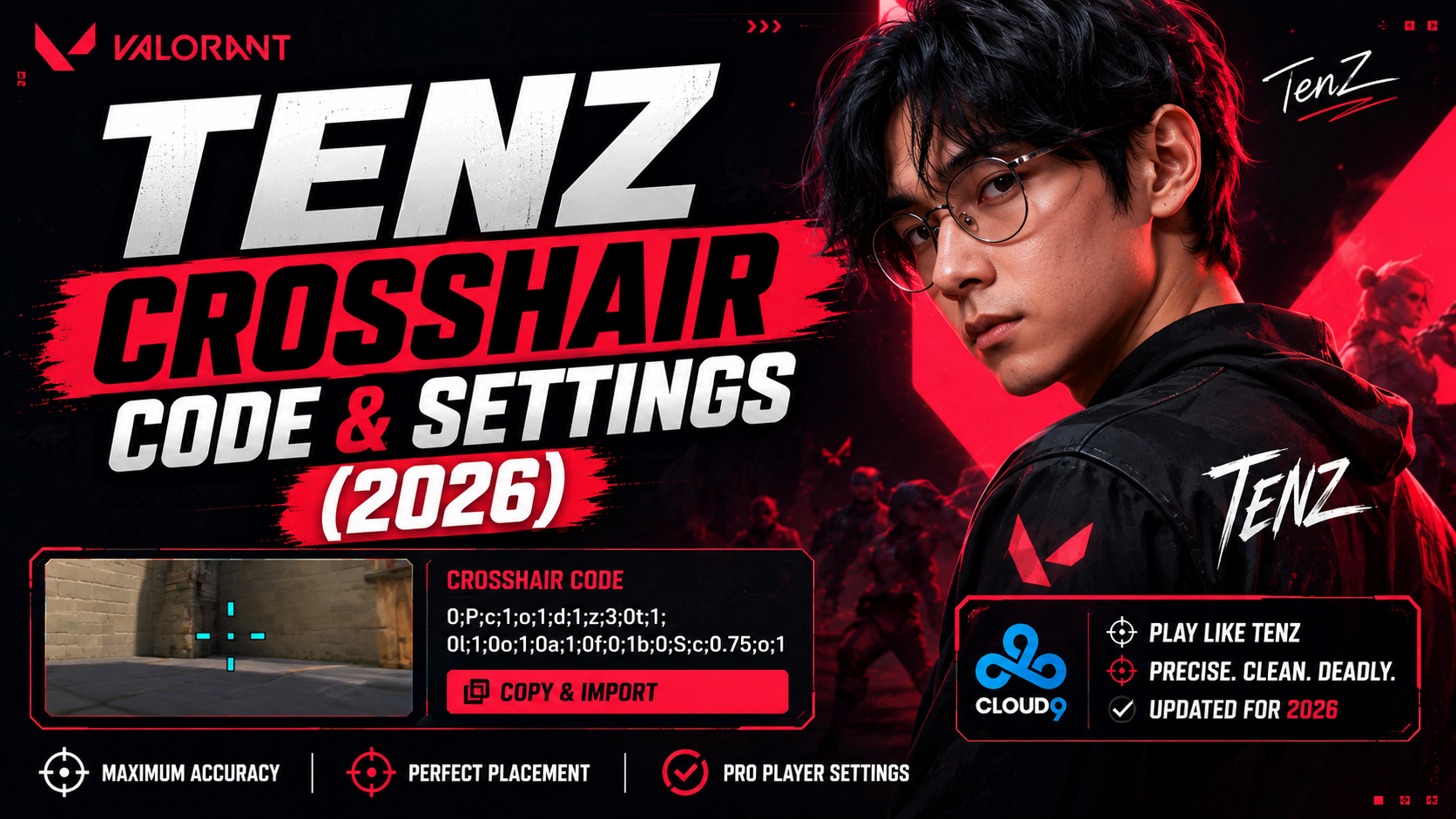
If you want to aim like TenZ, the fastest way to get started is by copying his exact crosshair code. TenZ is a former pro Valorant player known for sharp flicks and clean headshots, and his crosshair is one of the most copied in the game. This guide gives you the TenZ crosshair code, the full settings breakdown, and step-by-step import instructions written simply, so anyone can follow along.
TenZ's Crosshair Code (Copy and Paste)
Copy the code below and paste it directly into Valorant's crosshair import box.
0;s;1;P;c;5;h;0;m;1;0l;4;0o;2;0a;1;0f;0;1b;0;S;c;4;o;1
This TenZ Valorant crosshair uses a small cyan cross with no outline and no center dot, which keeps the middle of the screen clear for precise headshots.
TenZ Crosshair Settings Breakdown
Here is every setting broken down, so you can tweak it to match your own screen if needed.
| Setting | Value |
|---|---|
| Crosshair Color | Cyan (c;5) |
| Outline | Off |
| Center Dot | On |
| Inner Lines Length | 4 |
| Inner Lines Thickness | 2 |
| Inner Lines Opacity | 100% |
| Outer Lines | On |
| Firing Error Fade | On |
How to Import TenZ's Crosshair Code in Valorant
- Open Valorant and go to Settings.
- Click on the Crosshair tab.
- Select Import Profile Code in the top corner.
- Paste the code you copied above.
- Click Confirm, and the crosshair is applied instantly.
The whole process takes less than 30 seconds, and you can always switch back to your old crosshair profile if you don't like it.
Why TenZ Uses This Crosshair Style
TenZ's crosshair is small, cyan, and has no center dot. This is not random. It is a deliberate choice that helps in a few ways:
- A small crosshair does not block your view of the enemy's head at long range.
- Cyan stands out clearly against most Valorant maps without being distracting.
- No outline means the crosshair looks the same in bright and dark areas of a map.
- No center dot keeps the middle of the screen fully clear for tracking enemy movement.
This kind of crosshair works best for duelists and flick-heavy playstyles, since it rewards quick, precise aim rather than slow tracking.
TenZ's Sensitivity, DPI, and Gear
A crosshair alone will not fix your aim. Sensitivity and mouse settings matter just as much. Here is what TenZ uses:
| Setting | Detail |
|---|---|
| Sensitivity | 0.4 (older reference; check profile for latest) |
| DPI | 800 |
| eDPI | 320 |
| Mouse | Finalmouse UltralightX |
Note: pro players update their sensitivity often, so treat these numbers as a strong starting point rather than a fixed rule. Test a similar eDPI and adjust slightly until it feels natural for your own hand and mouse.
TenZ's Keyboard and VCT Background
Beyond his mouse, TenZ is also known for using a Wooting 80HE keyboard, which lets him set a very light actuation point for faster key presses. He plays on the VCT (Valorant Champions Tour) stage for Sentinels, which is where most of his settings and crosshair updates first get noticed by fans and content creators.
Watching his VCT matches is one of the best ways to confirm whether a crosshair code circulating online is current, since commentators often zoom in on player crosshairs during broadcasts.
TenZ's Crosshair vs Other Pro Crosshairs
If the cyan cross does not feel right for you, here is how it compares to other popular pro setups:
| Player | Style | Color | Best For |
|---|---|---|---|
| TenZ | Small cross, no outline | Cyan | Flicking on duelists |
| Aspas | Tight plus-shaped | Green | Close-range duels |
| Demon1 | Classic wide cross | White | All-round clarity |
| yay | Static outline cross | White | Long-range precision |
All four crosshairs share one thing in common: they are small and simple. Pro players rarely use large, cluttered crosshairs because a busy design covers up the enemy's head right at the moment you need to see it most. If you are new to custom crosshairs, start with TenZ's code, play a few games, and only move to a different style if it genuinely feels uncomfortable.
Common Mistakes to Avoid When Copying Pro Crosshair Codes
- Copying a code without checking the date it was last updated, as pro settings often change.
- Ignoring your own resolution and aspect ratio, which can make a crosshair look bigger or smaller than intended.
- Sticking with a crosshair that does not suit your agent role. Duelists and sentinels often need different crosshair sizes.
- Never testing the crosshair in a practice range before taking it into a ranked match.
Does Monitor Size and Resolution Matter?
Yes, a little. Crosshairs scale slightly differently depending on your resolution and aspect ratio. TenZ's code is designed around a standard 16:9 setup, so if you play on an ultrawide monitor, the crosshair may appear a touch smaller or larger than shown here.
The fix is simple: import the code first, then use the in-game preview to nudge the outline width or thickness by a point or two until it matches your screen comfortably.
Frequently Asked Questions
What is TenZ's crosshair code?
The code is 0;s;1;P;c;5;h;0;m;1;0l;4;0o;2;0a;1;0f;0;1b;0;S;c;4;o;1. Copy it and import it directly into Valorant's Crosshair settings, and it will apply exactly as TenZ uses it in official matches.
Is this crosshair free to use?
Yes. Crosshair codes are a built-in Valorant feature, so anyone can copy and import this code for free. There is no extra software, account, or payment involved.
Does TenZ's crosshair have a center dot?
No. This version relies only on the small cross lines, with no dot in the middle, which keeps the very center of the screen completely clear.
Can I change the color after importing?
Yes. Once imported, you can edit the color, size, thickness, and opacity from the same crosshair settings tab, so you can keep the shape but switch the color to whatever suits your eyes best.
Why does TenZ change his settings often?
Pro players regularly fine-tune sensitivity and crosshair settings based on new gear, game patches, or personal comfort during a season, so it's worth checking back for updates every few months.
Is a small crosshair always better than a large one?
Not necessarily. Smaller crosshairs suit players who rely on flicking and headshots, while slightly larger crosshairs can help beginners track moving targets more easily. TenZ's code is a strong option once your aim is already fairly consistent.
Final Thoughts
TenZ's crosshair code is a great starting point if you play duelists or prefer fast, flick-based aim. Import the code, play a few matches, and adjust the size or color slightly until it feels natural on your own monitor. Pairing it with a similar sensitivity and eDPI will get you even closer to his exact setup.
Remember that no crosshair instantly fixes your aim on its own. It simply removes distractions so your own practice and muscle memory can shine through. Give it a week of regular play before deciding whether it truly works for you.